
If you've been following the SAP BusinessObjects and Data Services EOL conversation, you've heard the term "Customer-Specific Maintenance" a lot over the past 12 months. It gets mentioned as the phase that follows mainstream maintenance, it sounds vaguely reassuring, and most people move on without reading the detail.
That's a problem. Because CSM is not what most people think it is — and for SAP BusinessObjects and SAP Data Services customers specifically, it represents a more significant shift than any previous version of post-mainstream support has ever been.
This article is about understanding exactly what changed, exactly what it means in practice, and exactly why "we'll just go into CSM" is not a strategy.
The primary source throughout this article is SAP Knowledge Base Article 3486924 — Customer-Specific Maintenance Phase for SAP BusinessObjects Business Intelligence, Version 8, released 13 May 2026. This is SAP's own definitive document on the subject. Everything that matters is in there. Most people haven't read it.


SAP's Customer-Specific Maintenance — What Changed, What It Costs You, and Why It's Not the Safety Net You Think It Is
"You're paying the same maintenance fee. SAP is no longer obligated to fix your bugs. That's the deal."
About the Author
Hi, I'm Clint and I've been knee-deep in the SAP Business Objects world for over 25 years now. Yeah, I know, longer than I care to admit. My first installation was way back in SAP BI 6.5 - back when Desktop Intelligence was still a thing. Needless to say, I've seen it all.
After running two wildly successful global SAP Analytics consulting firms, being a SAP Mentor, and speaking on all things SAP Analytics and SAP Business Objects around the world, I'm here to help. I've moved to the "employee of one" model, and I'm available worldwide to assist you with your SAP BO upgrade.
I get it - I know how SAP is moving towards a "cloud first" approach, just like every other big vendor out there. But I also know that customers need to keep their on-premise BI 4.x implementation running alongside SAP Analytics Cloud (SAC), as there's no seamless migration path to SAC. With all the lower versions of Business Objects, except for BI 4.3 and BI 2025, now being out of support, the need to upgrade for many customers is pressing. So, feel free to connect with me below to start the conversation or connect with me here or you can find out more about me here.


“With over 25 years in SAP Analytics, I’ve guided numerous businesses through seamless upgrades, ensuring minimal downtime and optimal performance.”
Who This Applies To — BI 4.3, DS 4.3, and IPS 4.3
Before going any further, let's be clear about scope. CSM from 1 January 2027 applies to the entire platform stack, not just the BI layer.
SAP Knowledge Base Article 3763590 — SAP BI Platform 4.3 — End of Mainstream Maintenance 31 December 2026, Version 6, released 12 June 2026 — explicitly lists every product in scope:
SAP BusinessObjects BI Platform 4.3
SAP BusinessObjects Information Platform Services 4.3 (IPS for DS)
SAP Crystal Reports for Enterprise 4.3
SAP BusinessObjects Live Office 4.3
SAP Crystal Server 2020
SAP Crystal Reports 2020
Every product in that list enters Customer-Specific Maintenance on the same date, under the same terms, governed by the same SAP Note 3486924. No exceptions and no hierarchy — BI platform, DS, IPS, Crystal, Live Office. Same cliff.
One more product worth noting: BI 2025 is also covered by SAP Note 3486924 — its mainstream maintenance ends 31 December 2027, with CSM starting 1 January 2028 on identical terms. That conversation is for next year. Right now the focus is the deadline six months away.
First: Understand What Just Changed — Because This Is New
Here is the thing that is genuinely new about this situation, and the thing that makes it materially different from every previous EOL cycle.
Every version of SAP BusinessObjects prior to BI 4.3 — BI 4.0, 4.1, 4.2, XI 3.1 and earlier — followed mainstream maintenance with a phase called Priority One Support. P1 Support was the safety net. Under P1, SAP would still investigate and fix production-stopping issues. The support scope was reduced, but if something went seriously wrong in your environment, SAP had an obligation to engage and resolve it. P1 Support came with a defined end date — typically two years after mainstream maintenance ended — and at that point, the product was genuinely end of life.
SAP Knowledge Base Article 3486924 is explicit about this history:
"Customer-Specific Maintenance is applicable to all SAP applications, except for certain applications and all versions within the SAP BusinessObjects Portfolio prior to BI 4.3. This means that Customer-Specific Maintenance will be introduced to the SAP BusinessObjects Portfolio with BI 4.3 and be applicable to all future BI20xx releases."
Read that carefully. CSM has never applied to SAP BusinessObjects before. BI 4.3 is the first version where it does. DS 4.3 follows the same model. Everything your organisation knew about what happens after BI or DS mainstream maintenance ends — the P1 safety net, the two-year window, the defined end of life — none of that applies anymore.
The rules have changed. Fundamentally.
What Priority One Support Used to Give You
To understand what has changed, you need to understand what P1 Support actually covered.
Under Priority One Support — which applied to BI 4.0, 4.1, 4.2, DS 4.2 and earlier — SAP would accept and analyse support cases of all priorities. If a new, unknown error was discovered, SAP would investigate it. For priority one issues causing production outages, SAP was obligated to provide corrections. You had a defined, time-bounded safety net with a clear end date. You knew where you stood.
P1 Support had genuine teeth: if something was broken in your production environment — BI or DS — SAP would fix it, even if it was a new, previously unknown problem.
That model is gone for BI 4.3 and DS 4.3 onwards. Replaced entirely by CSM.
What Customer-Specific Maintenance Actually Gives You
SAP Note 3486924 describes CSM in detail. Let me go through it systematically, because the individual clauses matter.
The 12-Month Security Window — And What CVSS 7.0 Actually Means
For the first 12 months of CSM, SAP will deliver security fixes — but only for vulnerabilities rated CVSS 7.0 or above. The Note states:
"Development will deliver security fixes during the first 12 months of CSM for VH and H security issues (CVSS >= 7.0) impacting BI."
CVSS stands for the Common Vulnerability Scoring System — the internationally recognised standard for rating the severity of security vulnerabilities, maintained by FIRST (Forum of Incident Response and Security Teams) and used by NIST's National Vulnerability Database. Scores run from 0 to 10. The scale is:
Critical: 9.0 – 10.0 — Remote code execution, full system compromise, immediate and widespread risk. Example: CVE-2024-41730, the SAP BusinessObjects missing authentication check vulnerability rated CVSS 9.8, which allowed an unauthorised user to obtain a logon token via a REST endpoint and fully compromise the system.
High: 7.0 – 8.9 — Significant threat, often allowing unauthorised access or control over affected systems
Medium: 4.0 – 6.9 — Moderate impact, typically requiring some existing level of access to exploit
Low: 0.1 – 3.9 — Minimal risk, hard to exploit or limited in impact
SAP's CSM threshold of CVSS ≥ 7.0 covers only High and Critical vulnerabilities. Everything rated Medium or below receives no patch under CSM — ever.
This matters more than it sounds. SAP BusinessObjects BI 4.3's own published CVE history shows a consistent pattern of medium-severity vulnerabilities that, while not catastrophic in isolation, have real security and operational implications in a production BI environment:
Cross-Site Scripting (XSS) in Web Intelligence and BI Launchpad — vulnerabilities allowing authenticated users with basic privileges to inject malicious scripts, potentially redirecting users to attacker-controlled sites, hijacking sessions, or accessing data within the scope of a victim's browser session. These consistently appear in the CVSS 4.0–6.5 range — below the CSM patch threshold.
HTML injection in Web Intelligence — allowing users with basic privileges to inject malicious code into input fields, affecting application integrity and potentially redirecting users. Medium-rated. Not patched under CSM.
Information disclosure in the Central Management Console — conditions under which restricted system data, configuration information, or directory structures become accessible without appropriate authorisation. Medium severity. No CSM patch.
Reverse tabnabbing in SAPUI5 components — allowing unauthenticated attackers to redirect users to malicious external sites through browser tab manipulation. Medium-rated. Below the threshold.
Missing XML validation in Crystal Reports components — enabling attackers to exploit endpoints to read server files or trigger denial of service. Severity varies but regularly falls in the medium range. No patch under CSM after the 12-month window closes.
Server-Side Request Forgery (SSRF) in BusinessObjects components — CVE-2025-42988, rated CVSS 3.0, addressing SSRF in SAP BusinessObjects, confirmed in SAP's June 2025 Security Patch Day. Under CSM, a vulnerability of this type would receive no patch.
None of these are trivial in a production BI environment. Unpatched XSS, information disclosure, and injection vulnerabilities are exactly the class of issue that internal security audits and penetration tests flag — and exactly the class that CSM will leave permanently unaddressed once the 12-month window closes.
For DS 4.3 and IPS 4.3 customers, the same principle applies. SAP Note 3486924 covers IPS explicitly, and SAP's DS Statement of Direction confirms CSM terms apply equally to DS 4.3. Data movement pipelines, repository access, and job scheduling through IPS are all governed by the same security patch threshold.
After 12 months of CSM, the Note is unambiguous:
"No new software delivery (SP, Patch, Hot fix, Private Note) will happen after the first 12 months."
From January 2028 — one year into CSM — there are no software deliveries of any kind for BI 4.3, DS 4.3, or IPS 4.3. Whatever the security posture of the software looks like at that point is the posture it maintains permanently.
New Bugs Are Billable
This is the clause that changes everything. SAP Note 3486924 states:
"If the error is not yet known and no SAP Note / KBA documenting the problem has been released for customers in the relevant release, it is considered a new, unknown error. In this case, further processing is considered a consulting service subject to charge."
Under mainstream maintenance, SAP fixes bugs. Under P1 Support, SAP at least investigated production-stopping bugs. Under CSM, if SAP hasn't already documented the problem, your support case becomes a billable consulting engagement.
You are paying the same annual maintenance fee. You are receiving a fundamentally different level of service.
The Note makes this commercial reality explicit:
"Processing of problems is Customer-Specific. This means that for known problems, the solution is still covered by maintenance. However, the customer may have to pay for the expense of solving new problems that are not yet known to SAP."
For DS customers, consider what this means in practice. A DS 4.3 ETL job fails. You log a support case. SAP analyses it. If it's a known, documented problem — you get the SAP Note. If it's new and undocumented — which is routine in active data pipelines as sources, targets, volumes, and configurations evolve — SAP treats it as a consulting engagement. You pay on top of your existing maintenance fees.
For BI customers, the same logic applies. A Web Intelligence report stops rendering correctly after a browser update. A scheduled publication fails. A universe connection drops. You log the case. If SAP has seen it before — known solution, covered. If it's new — billable. In a production BI environment where report behaviour, security configurations, and third-party integrations shift constantly, "new and undocumented" is not an edge case. It's a regular occurrence.
SAP Cannot Guarantee Resolution
This is written in SAP's own documentation:
"SAP cannot guarantee that every problem can or will be solved within Customer-Specific maintenance."
That is not a legal footnote. That is the stated support position for BI 4.3, DS 4.3, and IPS 4.3 from 1 January 2027 onwards. SAP is telling you, in writing, that they may not fix your production issue.
The Note also specifies two explicit categories where SAP will not provide corrections:
"SAP cannot provide corrections for: Problems caused by third-party software, especially if the software is no longer maintained by the third-party. Problems caused by software components whose source code is not available to the customer."
The first of those connects directly to your OS and database position. If your BI or DS server is running on Windows Server 2016 — which goes fully end of life in January 2027, the same month CSM starts — SAP cannot support it. A production problem sitting at the intersection of BI 4.3, an OS-level issue, and a database configuration gives SAP documented grounds to decline resolution on all of it.
No SLAs
The Note confirms that response time and resolution commitments disappear:
"The service level agreements for initial response times and corrective measures are no longer delivered."
Under mainstream maintenance, SAP commits to response time targets. Under CSM, those commitments are gone. You can still log a case. When you hear back — and whether it gets resolved — is no longer governed by a service level agreement.
No Legal or Compliance Updates
SAP Note 3486924 lists among the CSM restrictions:
"No delivery of legal changes."
And more broadly:
"During Customer-Specific maintenance, there are restrictions in the scope of service apply (No delivery of legal changes, technology update, etc.)"
If a regulatory change, a reporting standard update, or a compliance requirement emerges after BI 4.3 or DS 4.3 enters CSM, SAP will not update the software to accommodate it. For DS customers, this extends to data handling and pipeline configurations that touch compliance-sensitive data flows. Your environment may fall out of compliance not because anything broke, but because the world changed and the software didn't.
The Test Environment Is Gone
The Note states:
"Restrictions are in place due to SAP removing the internal system landscapes at the start of the Customer-Specific Maintenance of that release. As a result, it may only be possible to analyze the error directly in the customer system. For the analysis, the customer has to make a remote access available."
From 1 January 2027, SAP has no internal BI 4.3, DS 4.3, or IPS 4.3 environment. If you log a support case and SAP needs to reproduce your issue, they need remote access to your production system. Your security policy, your change management process, and your IT team all have views on that — particularly for a DS environment processing sensitive business data.
The Software Download Centre
The Note confirms:
"When a release is in the Customer-Specific maintenance phase, the Support Package Stacks that were available during mainstream maintenance are no longer visible in the Installation and Upgrades area and the main directories of the Software Download Center."
And:
"Please note that we do not support installations or upgrades to target releases that are in Customer-Specific maintenance. If you require the installation software, for example, when you migrate a database or an operating system, create an SAP customer message under the component XX-SER-SWFL-SHIP. Depending on the release, the provision of the installation software may require some processing time."
If you need to migrate your database or OS while BI 4.3 or DS 4.3 is in CSM — which many customers will need to do — you cannot simply download the installation software. You raise a special request and SAP processes it in their own time. That delay sits inside what is already a time-pressured remediation project.
You're Still Paying Full Maintenance Fees
SAP Note 3486924 confirms:
"During Customer-Specific Maintenance phase, you pay the maintenance fee in accordance with your maintenance contract (for example, SAP Enterprise Support or SAP Standard Support). The Customer-Specific Maintenance does not have to be ordered explicitly."
You pay the same. You receive significantly less. No SLAs. No legal updates. No guaranteed bug fixes. No new software after month 12. Billable consulting for new problems. No test environment on SAP's side. Security patches only for CVSS ≥ 7.0 — and only for the first 12 months.
The maintenance fee stays constant. The support contract changes materially. This is a conversation for your finance team, your legal team, and your risk team — not just IT.
The "No Expiry Date" Trap
SAP Note 3486924 includes this statement:
"Customer-Specific Maintenance does not have an expiry date."
Most customers read this and hear: "we can stay on BI 4.3 or DS 4.3 indefinitely." That's not wrong — SAP won't terminate the support relationship. But "no expiry date" doesn't mean "fully supported indefinitely." It means you are in a degrading support position with no hard forcing function to upgrade.
Under the old P1 model, there was a defined end date. At that point, the product reached genuine end of life and customers faced a hard deadline. Under CSM, there is no hard end date. Unpatched medium-severity vulnerabilities accumulate. The software drifts further from the current security baseline. Compliance exposure grows. And at some point — usually triggered by a production incident or an audit finding — the conversation becomes urgent under the worst possible conditions.
The absence of an expiry date is not reassurance. It's a slow-moving risk that many organisations will misread as permission to delay.
The Dates, Confirmed
SAP Note 3486924 and SAP KBA 3763590 together confirm:
BI 4.3, DS 4.3, IPS 4.3, Crystal Reports 2020, Crystal Server 2020, Live Office 4.3:
Mainstream Maintenance ends: 31 December 2026
CSM starts: 1 January 2027
Security patches (CVSS ≥ 7.0) delivered through: December 2027
After December 2027: no software deliveries of any kind
BI 2025 and DS 2025:
Mainstream Maintenance ends: 31 December 2027
CSM starts: 1 January 2028
BI 2025 and DS 2025 are not exempt from CSM — they enter the same phase, on the same terms, in January 2028. The difference is runway. One extra year of mainstream maintenance. That year matters.
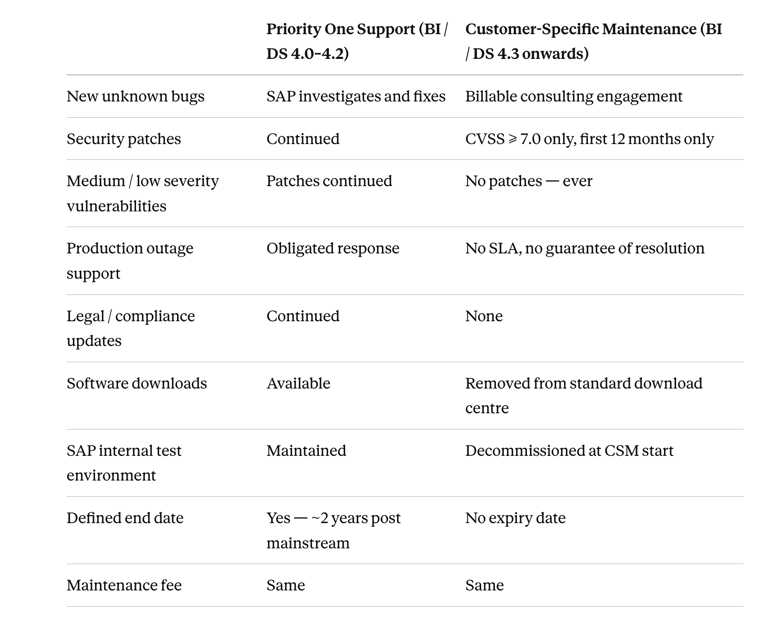
The P1 vs CSM Comparison in Plain Language
That table is the conversation your organisation needs to have before deciding to stay on BI 4.3 or DS 4.3 past December 2026.
My Recommendation
Twenty-five years in this space, and I have never seen a post-mainstream support model for SAP BusinessObjects or Data Services that carries this level of risk. P1 Support was a genuine safety net. CSM is not.
The right move — for BI 4.3 and DS 4.3 customers — is to be on a fully mainstream-supported version before these CSM terms become your operational reality. Six months of mainstream maintenance remains. That is enough time to start — if you start now.
For BI 2025 and DS 2025 customers: you have until December 2027. That feels comfortable. It isn't — not if you also need to address infrastructure, security configuration, and the breaking changes that BI 2027 and DS 2027 will bring.
Read SAP Note 3486924 in full. Share it with your finance team. Share it with your risk team. The decision to remain in CSM is a business risk decision, not just an IT one — and it needs to be made with a clear understanding of what SAP has actually committed to provide.
If you want to understand what the upgrade path looks like for your specific environment — BI, DS, or both — reach out. That conversation is free. Discovering what CSM means during a production incident is not.
Further reading from SAP:
SAP Note 3486924 — Customer-Specific Maintenance Phase for SAP BusinessObjects Business Intelligence
SAP Note 3763590 — SAP BI Platform 4.3 End of Mainstream Maintenance 31 December 2026
SAP Note 52505 — Support after end of mainstream maintenance or extended maintenance
SAP Note 3053725 — Security Corrections in Customer Specific Maintenance
KBA 2078591 — Priority-One Support Maintenance Phase for SAP BI
KBA 1550818 — Where to find archived Service Packs and Patches for SAP BusinessObjects
Here’s how we can work together:
Assess Your Current Environment
Understand your existing setup and challenges.


Develop an Upgrade Strategy
Tailored to your business needs and timelines.
Execute and Support
Implement the upgrade with ongoing support to ensure success.





My SAP Analytics Blog

Connect with me today to ensure your SAP BI 2025 Upgrade is a success !
Alternatively please send an email to sapupgrades@clintvosloo.com