
On 14 March 2025, SAP BusinessObjects BI 2025 went live. Just over a year later — and we're already talking about the next upgrade. If you're reading this thinking you've got some breathing room before that conversation — I need to stop you right there.
You don't.
If you've been following along, you'll know I've been tracking the BI 4.3 countdown hard — and before that, calling out that nine months evaporates faster than anyone plans for. The pattern never changes. The deadline is always visible. The planning always starts too late.
This article is about making sure that doesn't happen again.
SAP BI 2025 Just Turned One — But It's Already Time to Start Planning for BI 2027
"The infrastructure decision you make today determines whether BI 2027 is a controlled upgrade — or another scramble."
About the Author
Hi, I'm Clint and I've been knee-deep in the SAP Business Objects world for over 25 years now. Yeah, I know, longer than I care to admit. My first installation was way back in SAP BI 6.5 - back when Desktop Intelligence was still a thing. Needless to say, I've seen it all.
After running two wildly successful global SAP Analytics consulting firms, being a SAP Mentor, and speaking on all things SAP Analytics and SAP Business Objects around the world, I'm here to help. I've moved to the "employee of one" model, and I'm available worldwide to assist you with your SAP BO upgrade.
I get it - I know how SAP is moving towards a "cloud first" approach, just like every other big vendor out there. But I also know that customers need to keep their on-premise BI 4.x implementation running alongside SAP Analytics Cloud (SAC), as there's no seamless migration path to SAC. With all the lower versions of Business Objects, except for BI 4.3 and BI 2025, now being out of support, the need to upgrade for many customers is pressing. So, feel free to connect with me below to start the conversation or connect with me here or you can find out more about me here.


“With over 25 years in SAP Analytics, I’ve guided numerous businesses through seamless upgrades, ensuring minimal downtime and optimal performance.”
First, Let's Talk About How Much the World Has Changed
Because this is the context most people are missing.
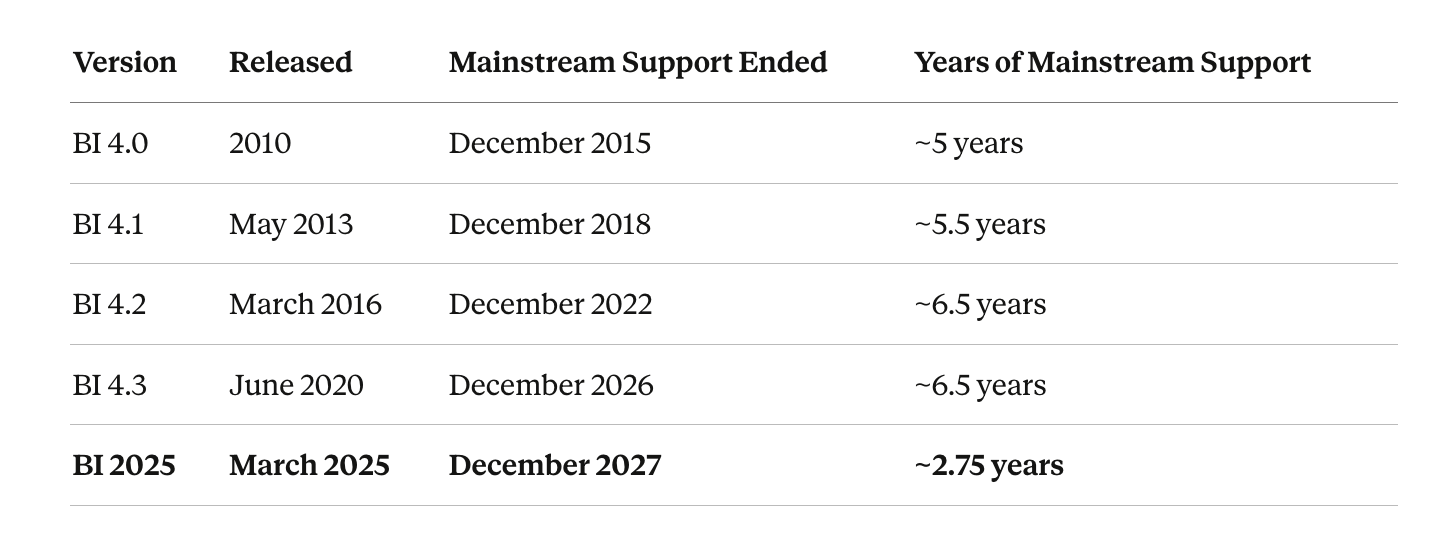
For the better part of a decade and a half, SAP BusinessObjects customers operated in a comfortable rhythm. A new major version would land, you'd have five to seven years of mainstream support, and you'd plan your upgrade somewhere in that window — probably late, but with enough margin that it worked out.
Here's what that actually looked like in practice and make sure you read that last line more than once...
Two years and nine months.
That is not a typo. That is not a mistake. SAP has moved to a two-year release cadence — BI 2027 is confirmed for Q4 2026, BI 2029 is already on the roadmap. I covered the full picture when SAP dropped their October 2025 Statement of Direction — read that if you want the detail behind the numbers. The era of the six-year version is over. The comfortable window where you could deprioritise upgrades and deal with it "eventually" is gone.
The reality on the ground right now — and I'm in these conversations every week — is that the majority of organisations are still on BI 4.3, with BI 2025 upgrade planning either just kicking off or still in the queue. BI 4.3 hits end of mainstream maintenance at the end of this year, and that deadline is finally making people move. So if that's where you are, this article is directly for you — because the infrastructure decisions you make right now, as part of your BI 2025 project, will determine how painful BI 2027 is going to be.
That's the new reality. Let's deal with it.
And here's the implication that almost nobody has fully processed yet.
In the old world — BI 4.x with its five to six year runway — you could pick a supported OS at upgrade time, install BI on top of it, and reasonably expect that OS to still be in mainstream support when your next BI upgrade came around. Windows Server 2019, for example, looked perfectly sensible on a BI 4.2 or 4.3 project. You had time. The OS lifecycle and the BI lifecycle roughly matched.
That maths no longer works.
With a 2.75-year mainstream window, if the OS you install on today is anything other than the most current available version, there is a real chance it will be out of mainstream support before your next BI release even ships. You've solved today's problem and quietly locked in tomorrow's.
This changes the strategy entirely — and here's the practical implication most people miss when they're heads-down trying to get off BI 4.3.
BI 2025 is internally versioned as BI 4.4 in the installation files. And as I covered in detail in What Features You're Losing and Keeping in BI 2025, SAP removed a significant amount of functionality in this release — Trusted Authentication hardened, SAML and SSL tightened, tools and features gone entirely. This is not a simple patch-and-carry-forward upgrade. It has real breaking changes. That's exactly why a side-by-side migration is the right approach for BI 2025 — you need a clean environment, a clean OS, a clean database, and the ability to validate properly before you cut over.
But here's the payoff that makes the upfront effort worth it.
If you do the BI 2025 migration properly — side-by-side, onto the latest OS and current-generation database — then when BI 2027 arrives, you are in a completely different position. Your infrastructure is already current and certified. Your platform is stable. The breaking-change work has already been done. BI 2027 becomes an in-place upgrade. Same server, same OS, same database — just the BI layer moving forward. That is significantly cheaper, significantly lower risk, and a fraction of the project complexity of a full side-by-side migration.
Do the hard work once, properly, now. Then the next cycle is straightforward.
The alternative — cutting corners on the BI 2025 migration to save time or money, landing on an older OS, skipping the side-by-side — means BI 2027 arrives and you're doing the hard work again, under a tighter timeline, with less runway to do it right.
BI 2025's Expiry Date, Spelled Out
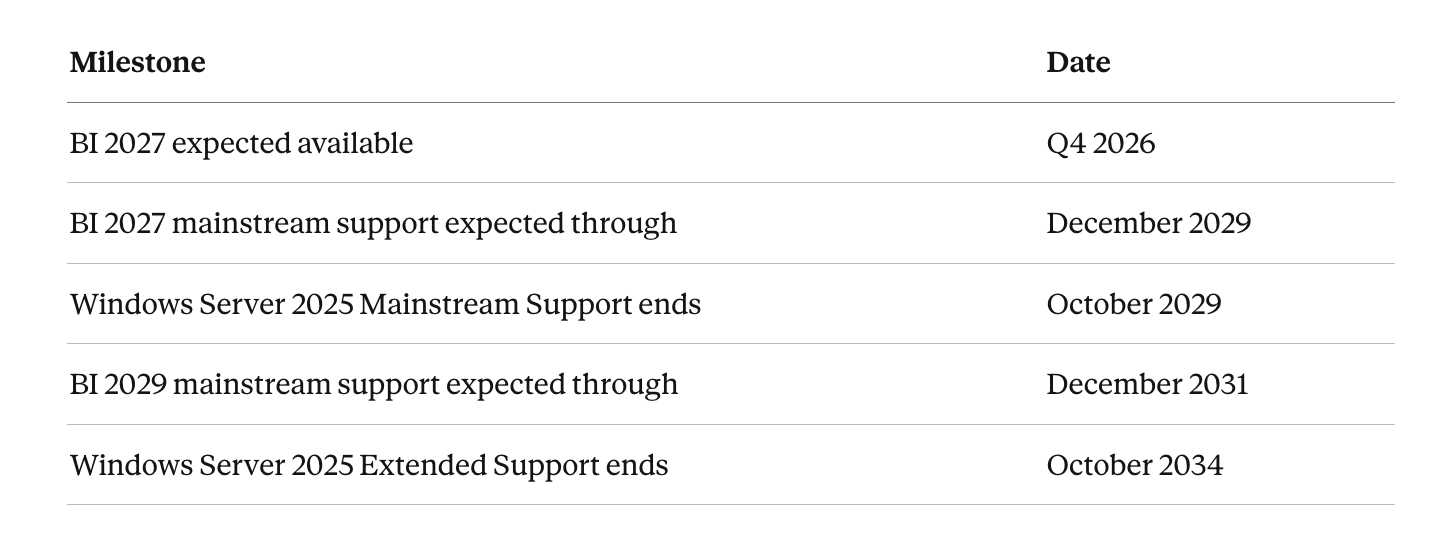
As I covered in my breakdown of SAP's October 2025 Statement of Direction, the confirmed roadmap is:
BI 2025 — Mainstream Maintenance ends 31 December 2027
BI 2027 — Expected Q4 2026, mainstream support through ~December 2029
BI 2029 — Confirmed, extending the on-premise roadmap to December 2031
BI 2027 drops in Q4 2026. That means the planning cycle starts now if you want to be in control of it rather than reacting to it.
Infrastructure Is Now the Star of the Show — And That's a Fundamental Shift
In the old world, the infrastructure conversation was almost an afterthought. You'd open the SAP Platform Availability Matrix, see what OS and database versions were supported, pick something current, and off you went. SAP would support it. The PAM was stable for years. Nobody lost sleep over it.
That model is gone.
With a 2.75-year release cadence, the PAM is now a moving target. What is fully certified and mainstream-supported when you build your BI 2025 environment may already be in or approaching Extended Support by the time BI 2027 lands. The comfortable assumption that "if it's in the PAM, SAP will cover us" no longer holds the way it used to — because the PAM itself will have shifted underneath you before your next upgrade cycle completes.
This changes the entire sequence of how you plan a BI upgrade. In the past, infrastructure was something you sorted as part of the project — a checkbox on the way to the real work. Now, infrastructure has to lead. You decide on the OS and database first — not based on what's currently supported, but on what will still be in mainstream support when BI 2027 arrives. Then you build BI on top of that decision.
Infrastructure first. BI 2025/7/9 on top. In that order. Every time.
If you take nothing else from this article, take that. Because the customers who get this right now are the ones who will have a straightforward BI 2027 upgrade. The ones who don't will be doing the hard infrastructure work again, under a tighter timeline, with less room to do it properly.
And while I'm here — if you're still doing in-place upgrades to "save time," you're solving the wrong problem. Every serious upgrade I've delivered in the last two and a half decades have been side-by-side. It gives you control, a proper rollback position, and the ability to land on the right infrastructure without the existing BI installation constraining your choices. In-place upgrades are how technical debt gets carried silently from one version to the next — and eventually it surfaces at the worst possible moment.
That's the framework. Now let's get specific about what the right infrastructure decision actually looks like.
The Windows Server 2022 Problem — And It Is a Problem
I'm going to focus on Windows exclusively here — because 99% of the production BI landscapes I work in are Windows-based, and that's where the real exposure is right now.
Here's what I'm walking into in the field: organisations that are planning their BI 2025 upgrade within the next six months, standing the new environment up on Windows Server 2022. It was in the SAP PAM. It was current at the time. It ticked every box.
And they've unknowingly locked themselves into another infrastructure project before BI 2027 even begins.
Windows Server 2022 Mainstream Support ends 13 October 2026.
This year. Before BI 2027 ships.
Mainstream vs Extended Support — The Difference Matters More Than Most People Realise
Microsoft's server lifecycle runs in two distinct phases, and the gap between them is significant:
Mainstream Support is the full service. Security patches, bug fixes, non-security hotfixes, new features, active development, and full technical support. The OS is a living, improving product.
Extended Support is a different animal. Security patches for serious vulnerabilities — that's it. No new features. No non-security bug fixes. Free technical support ends. Microsoft has stopped developing the platform. Extended Support for Windows Server 2022 runs until October 2031, but do not confuse "still receiving security patches" with "fully supported." It isn't.
Now the SAP angle: SAP will continue to list Extended Support OS versions in the PAM — but when something goes wrong, the practical reality is that issues need to be reproducible on a platform in current mainstream maintenance for SAP to fully engage. OS-specific issues on an Extended Support OS sit in a grey zone. Grey zones are expensive when they materialise during a production incident on a platform you've just upgraded.
If I'm being direct — and I always am — if you are on Windows Server 2022 right now, I would not be building a new BI 2025 landscape on it. Full stop. You're starting a multi-year production environment on an OS that is already in, or about to enter, its maintenance-only phase.
That's not a technical decision. That's not a risk acceptance. You're scheduling your next project.
The Database Layer: Real Risk, But More Manageable
I'll keep this proportionate, because the database conversation is genuinely less urgent than the OS one — but it can't be ignored.
Within the SIA, database migrations are well-understood and manageable. I've done many of them across many customer environments, and when you follow the process correctly, the risk is lower than most people expect going in.
That said — lower risk is not zero risk. A database migration is still a migration. There is data movement, validation, cutover, and testing involved. The last place you want to be managing that is inside an active BI upgrade project, where you're simultaneously dealing with application-layer changes, security configuration, and user acceptance testing.
Address the database proactively, as its own workstream, before the upgrade project kicks off. Get it done cleanly. Then it's not a variable.
What BI 2025 Already Taught Us — And BI 2027 Will Repeat
Here's the point that doesn't get said loudly enough.
In the BI 2025 upgrades I've been running, SAP tightened things in ways that caught a significant number of customers off guard. I covered this in detail in What Features You're Losing and Keeping in BI 2025, but the headline version is this:
Trusted Authentication was hardened — configurations that had run without issue in BI 4.x broke on contact with BI 2025 and required remediation
SAML and SSL certificate handling was tightened — authentication integrations nobody had touched in years suddenly needed attention
Substantial functionality was removed entirely — features and tools that customers relied on daily simply do not exist in BI 2025
These weren't edge cases or isolated environments. They were consistent patterns across multiple upgrades.
Here is what I know with absolute certainty: BI 2027 will not be easier than BI 2025. SAP does not walk back on security hardening. SAP does not restore deprecated features. Each release tightens the platform further, removes more legacy baggage, and raises the bar for what your underlying infrastructure needs to support. If your OS and database aren't clean and current when you arrive at that upgrade, you're solving two problems under pressure instead of one — and the unplanned problem is almost always the one that blows the timeline.
The Recommendation: Do the Hard Work Now, Once
Here's what I'm telling clients sitting on a stable BI 2025 environment today:
Use 2026 to execute a side-by-side migration onto Windows Server 2025 and the current generation of SQL Server (2022 at minimum, 2025 if your environment supports it). Not a BI upgrade — a pure infrastructure refresh. You're not touching the BI application layer. You're building the platform that BI 2027 will land on cleanly, in a controlled project with a single scope.
When BI 2027 ships in Q4 2026, you have a certified, modern, fully-supported platform ready. The BI upgrade project is just the BI upgrade.
Here's what that lifecycle looks like:
Windows Server 2025 mainstream support aligns almost exactly with BI 2027's expected mainstream window. Its extended support carries you through BI 2029 and well beyond. You do the infrastructure work once, and that decision buys you a decade of runway where infrastructure is never the bottleneck.
Compare that to Windows Server 2022: mainstream support already ending in October 2026, and you'd be starting your next BI landscape on a platform already heading in one direction.
The Bottom Line
The two-year upgrade cycle is real, it's confirmed, and it is not going back to the way things were.
BI 2025 mainstream maintenance ends December 2027. BI 2027 ships Q4 2026. Most organisations are planning their BI 2025 move right now — which means the window to make the right infrastructure decision is open, but it won't stay open for long. If you land on BI 2025 on the wrong OS foundation, you won't have 18 months of breathing room before the next cycle — you'll have an infrastructure problem sitting inside it.
Get onto Windows Server 2025 and current-generation SQL Server now, as part of your BI 2025 project scope, and make sure BI 2027 has a clean platform to arrive on. That's how you break the cycle of every upgrade being a scramble.
The infrastructure decision you make — or don't make — this year determines whether your next BI upgrade is a controlled project or another late-cycle scramble under pressure.
If you want to map this out against your specific landscape and timeline, reach out. That conversation is free. Fixing the wrong infrastructure decision halfway through an upgrade project is not.
Here’s how we can work together:
Assess Your Current Environment
Understand your existing setup and challenges.


Develop an Upgrade Strategy
Tailored to your business needs and timelines.
Execute and Support
Implement the upgrade with ongoing support to ensure success.





My SAP Analytics Blog

Connect with me today to ensure your SAP BI 2025 Upgrade is a success !
Alternatively please send an email to sapupgrades@clintvosloo.com